









Consulting & collaboration · Client identity withheld

SharePoint governance case study: control, clarity and cost

This SharePoint governance case study follows a 10-week Microsoft 365 improvement program for an Australian consulting firm. Compuloop addressed site ownership, guest access, document structure and overlapping licences.

Colleagues discussing shared work during a business meeting
$42KInvestment
$87.6KHard saving per year
$179KProductivity per year
5.7moPayback on hard savings

Project technologies and related platforms we support

Microsoft logo
The starting point

The business challenge

The firm moved to Microsoft 365 four years earlier with a “just let people use it” mandate. That worked well for adoption and badly for structure. Each project, client and internal initiative spawned a Team. In turn, each Team had a SharePoint site. Staff also had their own OneDrive accounts. Nobody had ever deleted anything.

The presenting problem was cost. The finance director noticed licence spend had grown 28% in two years against flat headcount and asked IT to explain. IT could not, because there was no licence assignment record and no view of actual usage.

What the assessment found

204 of 340 SharePoint sites inactive for 12 months. 61 sites with no identifiable owner — the creator had left the firm. 4.2TB of storage duplicated across OneDrive, SharePoint and email attachments. Reception and two admin staff holding E5 licences. Seventeen users holding three overlapping licences. No retention policy, so departed staff mailboxes and OneDrive accounts were retained indefinitely.

Why it mattered

The cost problem was real but secondary. The bigger risk was information governance. Client project files — including commercially sensitive material under confidentiality obligations — sat in sites with no owner, no retention policy, and permissions inherited from a 2019 Team. In two cases, external guest accounts still had access to client workspaces months after the project ended. For a consulting firm that is a contractual and reputational exposure far larger than the licence bill.

There was also a productivity cost nobody had measured. We timed a sample of common searches during discovery: the average time to locate a specific project deliverable was four minutes twelve seconds, and staff often gave up and asked a colleague.

Technology in context

What structured collaboration looks like

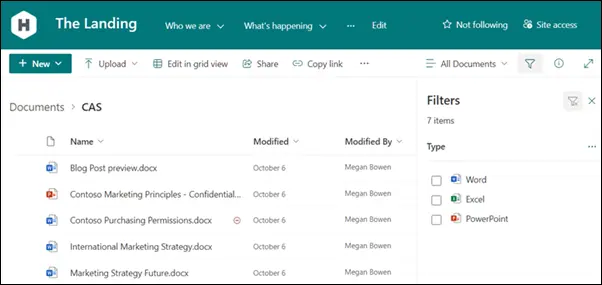
SharePoint document library showing team files and filters

A shared place for team documents

SharePoint document libraries bring files, metadata and views together. The case study explains how ownership and structure helped the client manage that environment.

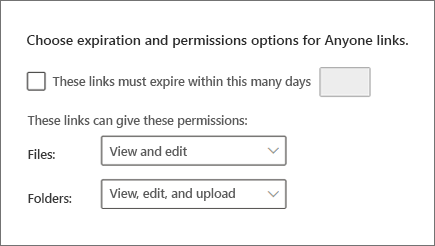
SharePoint settings for link expiration and file permissions

Sharing with deliberate boundaries

Link permissions and expiry settings are part of a wider sharing policy. The project addresses who can access information and when that access should end.

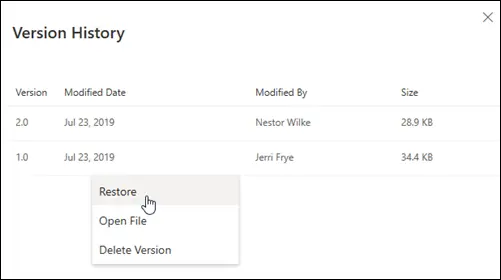
OneDrive version history product example

Recovering an earlier version

Microsoft’s OneDrive version-history example illustrates how a previous file version can be reviewed.

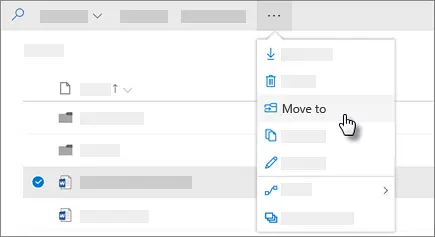
Moving files from OneDrive to SharePoint

Moving files with purpose

A Microsoft product example illustrates moving files between OneDrive and SharePoint.

The implementation

How this sharepoint governance case study was delivered

01

Weeks 1–2 · Discover and quantify

Full tenant inventory of sites, Teams, OneDrive, licence assignments and guest access. Built a cost and risk baseline: storage per site, inactivity, ownership gaps, external sharing, licence cost per active user. Presented to the executive as a single page.

02

Weeks 3–5 · Design the architecture

Hub-and-spoke structure: firm-wide intranet hub, clients hub with one site per project, department hubs. Defined naming conventions, a site provisioning process requiring a named owner, and a permissions model based on Entra ID security groups rather than direct assignment.

03

Weeks 4–7 · Clean, migrate, archive

Archived the 204 inactive sites to read-only storage pending owner confirmation, reassigned or closed the 61 ownerless sites, removed external guest access from closed engagements, and consolidated duplicated content into the new structure. Delivered in waves by department.

04

Weeks 6–9 · Govern

Teams and SharePoint lifecycle policies (inactive review at 12 months, archive at 18), retention labels for client project records, sensitivity labels for confidential material, app consent policy, guest access expiry, and external sharing restrictions by site type.

05

Weeks 8–10 · Optimise and embed

Right-sized 120 licences against actual usage: 23 users moved E5→Business Premium/E3, 17 duplicate assignments removed, admin staff reassigned to Business Basic. Role-based training, a site owner workshop, and a one-page “where do I save this?” guide.

Practical obstacles, handled in stages

  • “Don't delete my files” resistance. Nothing was deleted. Inactive sites were made read-only with the owner notified and given a 60-day window to object. This removed almost all political friction.
  • Confidentiality across client engagements. The old model granted access by team membership, which had leaked across engagements. We rebuilt permissions on security groups with per-client membership and audited every external guest.
  • Licence downgrades hitting real features. Two users genuinely needed E5 for advanced compliance. We found them through actual feature usage rather than assumption and retained their licences.

Controls that stay in place

The project also established repeatable processes. These controls support ongoing operation after the initial rollout.

  • Site lifecycle policy — inactive sites flagged at 12 months, archived at 18
  • Licence reclamation — unassigned and duplicate licences surfaced automatically
  • Retention and sensitivity labels applied by policy, not by hand
  • Site provisioning workflow — every new site requires a named owner
  • Guest access expiry — external access revoked on schedule
  • Licence usage reporting — feeds the annual true-up conversation

Bring structure to Microsoft 365

Talk through your priorities, current systems and next practical step with Compuloop.

Discuss your project
Measured change

SharePoint governance case study results

The following before-and-after figures relate to this engagement. The scope and starting position matter when comparing them with another business.

MeasureBeforeAfter
Active SharePoint sites340 (204 inactive)128 active, 212 archived
Sites without a named owner610
Total storage11TB7.9TB
Licence SKUs in use63
Annual licence spend$312,000$234,000
Avg. time to find a document4 min 12 secunder 30 sec
Open external guest accounts9431 (active engagements only)

Time returned to the team

4m12s → 28s

Average document search

3,256 hrs/yr

Staff time recovered

6h → 30m

Monthly licence admin

45m → 5m

New site provisioning

The financial picture

Project-specific financial model. Avoided losses and productivity benefits are estimates, not guaranteed cash savings or returns.

Line itemValue
Project investment (10 weeks)$42,000
Annual hard saving: licence right-sizing$78,000 / yr
Annual hard saving: reduced storage consumption~$9,600 / yr
Productivity: 3,256 hrs at $55 loaded~$179,000 / yr
Avoided: further licence growth (14% y/y)~$44,000
Avoided: confidentiality breach exposureNot quantified
Payback~5.7 months on hard savings alone

Lessons for your business

  • Ungoverned M365 adoption creates a compliance problem before it creates a cost problem. Audit external sharing first.
  • Every site needs a named owner or it should not exist. This single rule prevents most sprawl.
  • Right-size licences against measured feature usage, not job titles — but verify before downgrading, or you'll break someone's workflow.

Explore the relevant services

Background guidance: read the relevant official framework or product documentation. This explains the technology; it is not independent verification of this client project.

Discuss a similar project

If this sharepoint governance case study reflects a problem in your business, start with a scoped conversation. Tell us about your sites, people, systems and current priorities. We can then identify the right assessment, the practical constraints and the evidence you need.

Compuloop case studies

Download case study

SharePoint governance case study: control, clarity and cost

Enter your details and agree to email updates. We will email a secure link that confirms your address and opens this PDF. You can unsubscribe from marketing at any time.

    Compuloop Pty Ltd collects these details to manage your PDF request and email subscription. Your contact details and consent record are stored using our WordPress/Mailchimp integration; Mailchimp may process data overseas. We do not enrol you in SMS marketing. Read our privacy policy or contact sales@compuloop.com.au.