Sender identity
Check the real address and domain, not only the display name.



Authorised phishing simulations, short learning modules and organisation-level reporting for Australian teams—designed as a repeatable learning programme, not a staff “gotcha”.

Generic annual training is easy to complete and easy to forget. A useful awareness programme connects a realistic message to a repeatable business response: pause, verify through a trusted channel and report the concern early.
Scenarios can reflect payment changes, shared-document invitations, account prompts or unusual executive requests without collecting real passwords or exposing personal results as a public leaderboard.
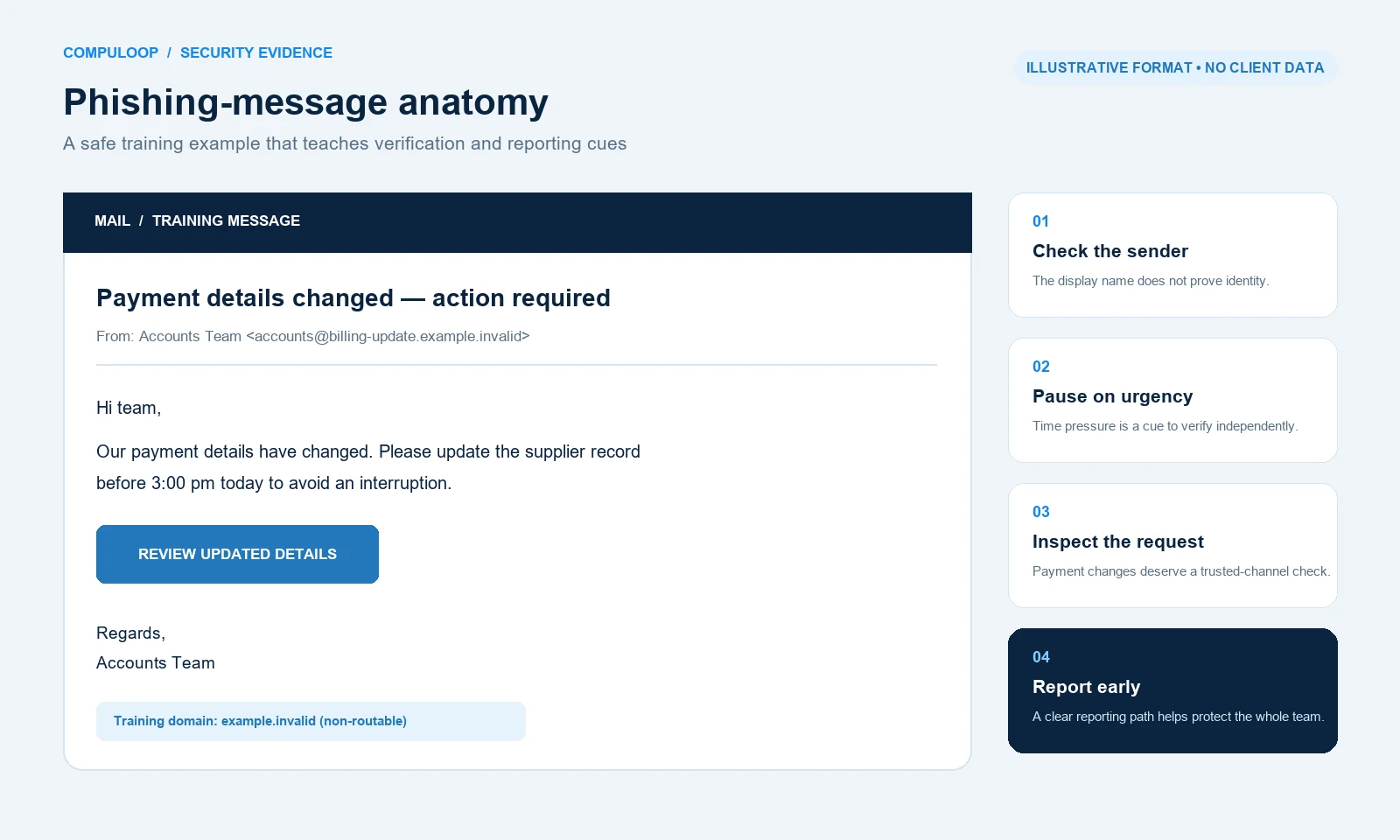
Check the real address and domain, not only the display name.
Slow down when a message tries to compress a business decision.
Use a known phone number, existing workflow or separate channel.
Make the escalation route clear enough to use without hesitation.
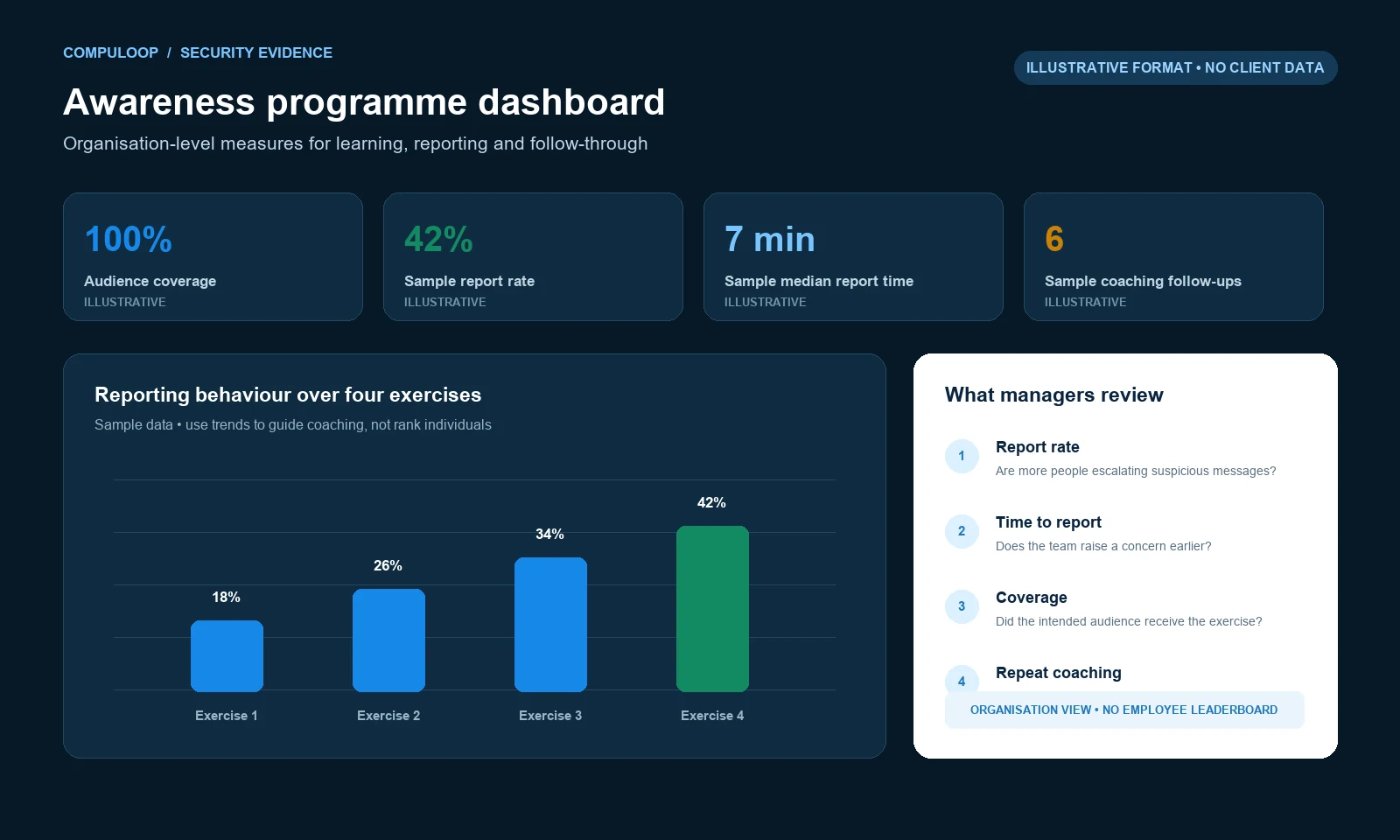
Organisation-level trends help managers decide where to simplify a process, strengthen a technical control or repeat a lesson. They should not be presented as proof that incidents cannot happen.
Compuloop can quote and manage several awareness and phishing platforms. The right choice depends on Microsoft 365 licensing, email controls, audience size, reporting needs and how much ongoing campaign management your team wants.
 Simulate and coach
Automated phishing simulations, awareness modules and reporting can sit alongside Sophos email and endpoint controls.
Ask about Sophos Phish Threat Protect and measure
Phishing simulation, security awareness training, user risk scoring and email protection can be managed as one human-risk programme.
Ask about IRONSCALES Run regular learning
Security awareness training and phishing testing can support a repeatable programme for teams that need simple ongoing delivery.
Ask about Webroot SAT Use the Microsoft stack
Eligible Microsoft environments can use attack simulation and reporting alongside existing identity, email and security controls.
Ask about Microsoft Attack SimulationHow this works: these are optional technology choices—not products automatically included in every service. Compuloop confirms the operational need, licence eligibility, Australian availability, data region, compatibility and final commercial scope before supply.
“The goal is faster recognition, safer verification and confident reporting.”
Training supports technical protection; it does not replace email authentication, access controls or incident response.
Notice pressure, unexpected changes and identity cues before acting.
Confirm payments, credentials and sensitive requests independently.
Make the reporting path clear enough to use without hesitation.
Use organisation-level patterns to improve controls and communications.
Audience, internal communications and reporting rules are agreed before the first simulation.
Agree participants, scenario rules and internal contacts.
Deliver one authorised phishing simulation each month.
Follow with one short, relevant learning module.
Discuss organisation-level reporting and the next priority.
A manageable monthly cycle for teams that need consistent learning and useful reporting without an oversized programme.
+$199 setup · minimum $120 per month
AUD excluding GST. Indicative only: platform, audience, contract term, availability and final scope require written confirmation.
A credible programme should improve behaviour without creating fear or collecting information it does not need.
The proposed programme does not collect employees’ real passwords.
Participants, communications and reporting rules are agreed before launch.
Training reduces avoidable risk but cannot guarantee incidents will not occur.
We will confirm the agreed audience, simulation rules, communications, platform and commercial terms in writing.
No. The proposed programme does not collect employees' real passwords.
No. The goal is to improve recognition, verification, reporting and business processes. Participants, communications and reporting rules are agreed before the programme starts.
The agreed platform can provide a short learning prompt or assign a relevant module, depending on the final programme design. The response is intended to reinforce a safer habit, not publicly shame the employee.
The indicative programme includes one authorised phishing simulation and one short learning module each month, with a quarterly improvement review. The final cadence is confirmed in writing.
They can, if they are included in the authorised audience. Different roles may face different risks, so the rollout and onboarding process should be agreed before campaigns begin.
Platform features permitting, scenarios and learning can reflect common Microsoft 365 and business workflows. Simulations remain within agreed guardrails and do not collect real credentials.
The standard programme uses organisation-level reporting. Available measures can include delivery, interaction, reporting and training-completion trends, depending on the chosen platform and agreed privacy rules.
Use private coaching, short remedial learning and an agreed management process. Repeat risk should be handled respectfully and consistently, with attention to confusing business processes as well as individual behaviour.
No. Awareness training complements email authentication, access controls, secure configuration, endpoint protection and incident response. It cannot guarantee that phishing or other incidents will not occur.
No. It is indicative. The selected platform, authorised audience, contract term, availability and final scope must be confirmed in a written quote.
Independent guidance: ASD small business cyber security handbook. It complements the service scope; it does not certify this service.