Microsoft 365 Copilot can help Australian business owners spend less time drafting, searching and catching up. However, a useful rollout starts with a business problem, not a licence order. Choose the work you want to improve, check access to company data and measure the result before expanding.
If you run a professional services firm, a growing trade business or a multi-site team, the question is practical: will this tool improve work enough to justify its full cost? This guide covers Australian pricing, useful tasks, security checks and a measured pilot.
The short answer: start with a small group who repeat document, email or reporting tasks. Give each task an owner and a quality check. Then compare the time saved with licence, setup, training and support costs.
Published 23 October 2026 · By the Compuloop team · Pricing and product sources checked on publication.

What does Microsoft 365 Copilot do?
Microsoft 365 Copilot brings AI assistance into everyday work. Depending on your licence and setup, it can help draft documents, summarise information and work with content in Microsoft 365. Microsoft’s current documentation now uses the name Microsoft Copilot for the work product, while some licences and interfaces still use the earlier name.
For owners, the value is not another chat window. It is a shorter route from scattered information to a useful first draft or a clearer next action. Nevertheless, people still need to check the evidence, correct mistakes and approve anything sent to a customer. See Microsoft’s product overview.
Microsoft 365 Copilot versus Copilot Chat
An eligible Microsoft 365 account can include access to Copilot Chat without an extra Copilot licence. The fuller work experience requires the relevant paid entitlement. Therefore, check the exact features your staff need rather than assuming every Copilot button means the same thing.
In addition, your IT provider should confirm the eligible base subscription, work account, supported apps and mailbox requirements. Availability also depends on your organisation’s settings. Use Microsoft’s current requirements before purchasing.
Microsoft 365 Copilot pricing in Australia
The following are Microsoft’s advertised Australian prices, checked on 23 October 2026. All figures are AUD per user/month, excluding GST, paid yearly on an annual subscription.
| Microsoft plan | Advertised price | What to check |
|---|---|---|
| Microsoft 365 Copilot Business add-on | From A$26.91 | Promotional first-year price; eligible existing Business plan required. |
| Microsoft 365 Business Standard with Copilot | A$35.20 | Bundle rather than the add-on alone. |
| Microsoft 365 Business Premium with Copilot | A$47.90 | Compare the included business and security features. |
The add-on promotion is advertised through 31 December 2026, subject to eligibility and change. Annual subscriptions auto-renew. Some advanced AI experiences carry usage charges. Confirm the checkout terms and renewal price on Microsoft’s Australian pricing page.
These are Microsoft reference prices, not a Compuloop quote. In addition, your budget should cover any existing subscription, data clean-up, staff training, rollout work and ongoing support. Ask for those items separately so you can compare the full cost.
Four useful Microsoft 365 Copilot workflows
1. Catch up on a customer email thread
A long supplier conversation can hide the latest decision. In Outlook, Copilot can summarise an email thread and show references to messages. For example, an account manager could use that summary to prepare a draft handover. Then they should open the source emails and confirm prices, dates and commitments.
However, the useful measure is not the number of summaries generated. Instead, compare the time needed to produce an accurate handover. Microsoft’s Outlook guide explains the feature and supported experiences.
2. Turn approved notes into a proposal draft
In Word, staff can start a draft from a prompt and reference material. They can also refine existing text. A sensible business use is a first draft based on an approved scope, a current template and clear customer requirements.
However, do not ask the tool to invent a price, warranty or delivery promise. Therefore, a person must check those details before release. For the current process, read Microsoft’s Word drafting guidance.
3. Ask better questions about a spreadsheet
Copilot in Excel can help explore data and work with formulas, tables and charts. For instance, an operations manager might ask which regions show unusual monthly changes. First, check that the source data is complete and consistent. Next, inspect the result and confirm the calculation before using it in a management report.
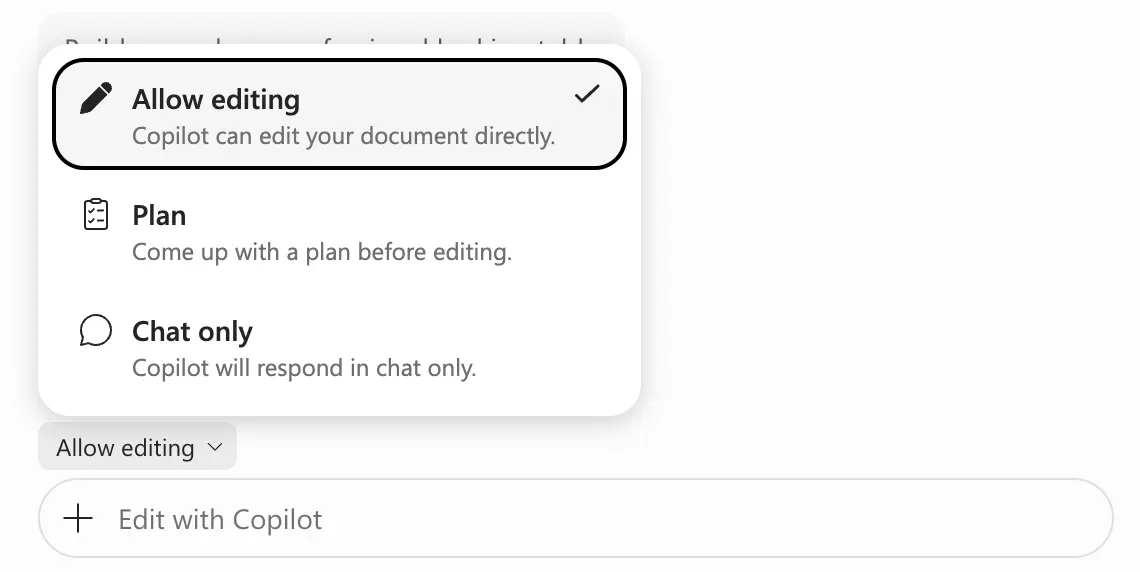
As Microsoft’s Excel guide shows, available modes can include editing, planning and chat. Select the mode that fits the task and the level of control you need.
4. Prepare a focused management update
For example, give a manager an approved set of project notes, a clear audience and a fixed output format. Then ask for a draft update that separates decisions, open questions and next actions. This is a practical pilot task because another person can compare the draft with the source.
For example, a logistics business could test a weekly depot update. A professional services firm could trial a client handover. These are suggested use cases, not claims about completed Compuloop projects or guaranteed savings.
Make your first Copilot investment a measured one
Discuss your Microsoft 365 setup, access risks and first useful workflow with Compuloop.
Microsoft 365 Copilot security: check data access first
Microsoft says the commercial work service respects existing access permissions. In addition, it says prompts, responses and organisational data accessed through Microsoft Graph do not train its foundation language models. Yet those commitments do not fix a folder that your business has already shared too widely.
For example, if a staff member can open a sensitive document today, an AI-assisted search may make that information easier to find. Review the existing access first. Also check connected agents and web search separately, because those features have their own data-handling considerations. Read Microsoft’s privacy and security explanation.
- Accounts: use named work accounts and confirm how MFA and admin access are managed.
- Files: review SharePoint, Teams and OneDrive permissions, including old sharing links.
- Content: separate current, approved material from outdated drafts.
- Staff rules: define what information people may enter and who checks outputs.
- Ownership: assign someone to review use, questions and incidents during the pilot.
Australian businesses should also consider personal information, supplier terms and overseas data handling before approving an AI tool. The OAIC’s commercial AI guidance is a useful starting point. A product licence alone does not establish that your particular use meets every privacy obligation.
Need to improve the underlying setup? Explore our Microsoft 365 support and business cybersecurity services. Our SharePoint governance case study also explains relevant groundwork; it is not a Copilot deployment case.
Build the business case for Microsoft 365 Copilot
First, use your own costs and observed results. Start with this calculation:
Monthly value of usable time saved − total monthly cost = estimated net value.
In particular, count review and correction time. Include rollout and training costs over the period you expect to use them.
For example, consider this illustration, not a Compuloop price or a promised result. Assume a fully costed pilot is A$50 per user each month. If usable staff time is worth A$60 an hour, the pilot needs about 50 minutes of net time saved per user/month to cover that cost.
That only has business value if people use the released time productively. Therefore, record the original task time, the AI-assisted time and the checking time. Also record any errors that could affect a customer. However, a faster draft is not a saving when it creates extra rework.

A practical 30-day Copilot pilot
Week 1 — choose and prepare. Pick two repeatable tasks and a small group. Record the baseline, check access and agree what success means.
Week 2 — train and test. Use approved documents and simple prompts. Ask staff to note mistakes as well as useful results.
Week 3 — refine. Remove weak use cases. Improve the instructions and source material. Keep human approval on customer-facing work.
Week 4 — decide. Compare net time, output quality and full cost. Then expand, adjust or stop the pilot based on evidence.
Ask your IT provider these questions
- Which exact work tasks justify the licences?
- What must change in our data access before we start?
- What are the first-year and renewal costs?
- Who will train staff and check the outputs?
- How will we measure value after 30 days?
Compuloop can discuss Microsoft 365 readiness, file access, rollout planning and ongoing support with Australian businesses. We agree scope before work begins. You can also review our managed AI services if your requirement extends beyond a workplace assistant.
Microsoft 365 Copilot questions from business owners
Is Microsoft 365 Copilot worth it for a small business?
It can be when staff repeat suitable tasks and can check the results. Start with a small pilot, include the full cost and measure useful time saved. Do not buy it for everyone before testing whether your workflows benefit.
Does every employee need a paid licence?
Not every role needs the same features. Check the required entitlement for each task and assign licences accordingly. Eligible users may already have Copilot Chat access, while fuller work capabilities require the appropriate paid licence.
Can Copilot see confidential business documents?
The work service is designed to use content the individual already has permission to access. Therefore, review existing permissions before rollout. Broad access to confidential files remains a business risk even when AI respects those permissions.
Do we need to move our files first?
Not necessarily. First identify where the pilot’s source material lives, who owns it and whether the right people can access it. Then fix gaps in that workflow. Avoid moving every company file without a clear plan.
Can Compuloop help us choose and roll it out?
Yes. Tell us your current Microsoft 365 plan, team size and the work you want to improve. We can discuss readiness, access controls, a pilot and the support scope before quoting.
Start with a useful task and a clear owner
Microsoft 365 Copilot is a business tool, not a substitute for management or sound IT controls. The strongest starting point is a repeatable task, reliable source information and someone who can check the result. From there, expand only where the evidence supports it.
Talk to Compuloop about your first Copilot workflow, or call 1300 007 613.
Sources and image credits
Microsoft product, pricing, requirements and privacy documentation is linked beside the relevant information above. Features, availability and prices can change. Business photography: Yan Krukau and Thirdman, used under the Pexels licence. Microsoft screenshot: Used with permission from Microsoft.