A business continuity plan answers a question every Australian business owner should be able to answer: if your email, internet or main system stopped working tomorrow, how would you keep serving customers?
The answer needs more than a backup subscription. It needs people who know what to do, a workable alternative and evidence that your important systems can recover. This guide helps Australian small and medium businesses turn those decisions into a practical plan, with a starter worksheet and three scenarios to test.
The short answer
Identify the work you cannot afford to stop. Decide how long it can wait, how much recent data you could lose and who can authorise recovery. Then test the alternative way of working before you need it.
Start here: pick one critical activity—taking orders, paying staff or accessing client files—and trace every person, system and supplier it depends on.
What is a business continuity plan?
A business continuity plan sets out how an organisation will maintain essential activities during disruption and return to normal afterwards. It covers people, premises, suppliers, communications and technology. An IT disaster recovery plan is one part of that broader effort.
For example, restoring your accounting server does not help customers if nobody can answer the phone. Likewise, staff may have working laptops but no way to receive an authentication code. Plan around complete business activities, not just a list of devices.
Australian Government emergency management guidance separates preparation, emergency action and recovery. It also puts people’s safety first. Your IT arrangements should support that wider plan, not replace evacuation procedures or advice from emergency services.
| Component | The question it answers | Example |
|---|---|---|
| Business continuity | How do we keep essential work moving? | Divert customer calls and use an approved alternate workplace. |
| Disaster recovery | How do we restore the technology safely? | Recover the application, database and access needed to process orders. |
| Backup | Which recoverable copies do we have? | Protected copies of business data, with known retention and restore points. |
Start with the work that pays the bills
Choose your five most important activities. Think about customer deadlines, cash flow and obligations, rather than which application costs the most. An accounting practice might prioritise client documents and payroll. A wholesaler might start with orders, stock availability and dispatch.
For each activity, record the systems, accounts and suppliers involved. Include the less obvious dependencies: domain and DNS access, the internet connection, payment terminals, printers, the office phone system and the person who approves a purchase.
Ask a second staff member to follow the process. If they cannot locate the supplier details or explain the workaround, that is a gap worth fixing. Keep a controlled offline copy of the plan and emergency contacts. Store credentials in a secure password manager, not in the plan itself.
Set realistic recovery targets before buying tools
Two measures make your business continuity plan easier to test:
- Recovery time objective (RTO): your target time to restore a service after disruption.
- Recovery point objective (RPO): the maximum period of recent data loss your business is prepared to tolerate.
These are requirements to design for, not promises a backup product automatically meets. Include the time to detect the issue, obtain approval, regain access, restore data and confirm that staff can work.
As an illustrative example, an order-processing system might need a four-hour RTO and a one-hour RPO. If the last usable copy is from yesterday, it cannot meet that one-hour data-loss target. If restoring files takes two hours but rebuilding access takes six more, the overall service misses its recovery-time target too.
Put an Australian-dollar value on downtime
Use your own figures to compare the cost of disruption with the cost of protection. A simple starting point is affected staff hours multiplied by loaded hourly employment cost. Add demonstrable lost margin, recovery expenses and contractual costs where relevant, without counting the same loss twice.
For illustration only: 12 affected staff × four hours × A$60 per hour = A$2,880 of staff-time exposure. That is not necessarily an extra cash expense or a total loss estimate; some work may be recovered later. It is a useful discussion starter, not an Australian industry benchmark or a Compuloop quote.
Record what a shorter outage is worth to your business. Then ask whether better backup and restore testing, a second internet path or a simpler manual process addresses the biggest risk.
Business continuity plan: a starter worksheet
Copy these fields into your own document and complete them with the people who do the work. This is a technology-focused starting point, not a complete emergency, legal or insurance plan. For a broader document, use the free template linked in the Australian Government guidance above.
| Record | What to write down |
|---|---|
| Activity and minimum service | Which customer or operational task must continue? What reduced service is acceptable? |
| Owner and deputy | Name the decision-maker, backup contact and person who can approve spending. |
| Activation trigger | State when you switch to the workaround and who makes that decision. |
| Dependencies | List applications, identity, internet, power, devices, premises and external suppliers. |
| Recovery targets | Record RTO, RPO and any deadlines that change the priority. |
| Workaround | Describe how staff will work safely, record transactions and avoid duplicate processing. |
| Recovery evidence | Record the last successful test, measured recovery time, data checks and unresolved gaps. |
| Communication | Identify who contacts staff, clients and suppliers, using which alternate channel. |
| Return to normal | Name the approver and explain how temporary records will be reconciled. |
| Review | Add a version date, next exercise date and owners for follow-up actions. |
Keep this document available when your normal email and file storage are unavailable. Limit access to sensitive contact and system information. A copy on the affected server alone is not enough.
Your Microsoft 365 data needs a recovery decision
Cloud services reduce some infrastructure responsibilities, but you still need to decide how your business will recover deleted or damaged information. File sync, retention settings, service availability and backup are different capabilities. Check what your actual configuration protects rather than assuming every file or account has the same recovery options.
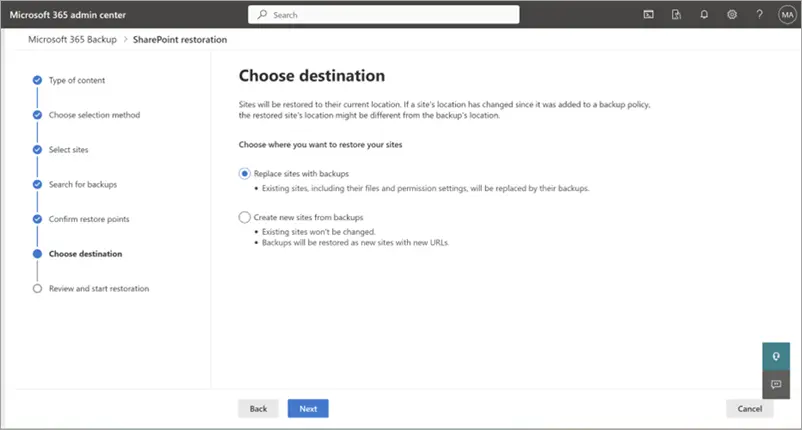
Microsoft documents restore workflows for backed-up OneDrive accounts, SharePoint sites and Exchange content. Those workflows involve choosing a recovery point and destination. Replacing content in place can overwrite healthy changes made after that point, so recovery needs an authorised decision—not a hurried click.
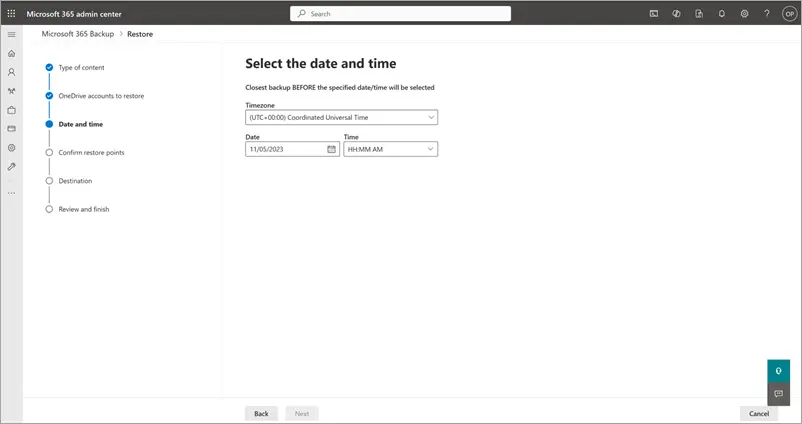
Ask which mailboxes, sites and accounts are protected, what retention applies, and who can initiate recovery if your normal administrator is unavailable. Also check licensing, storage location, access controls and how you would recover during an identity incident. A supplier’s platform resilience does not answer every one of those questions.
Compuloop’s Microsoft 365 support and business cybersecurity services can help connect those decisions with day-to-day administration.
Three scenarios to test with your team
These are illustrative Australian business scenarios, not reported incidents, client case studies or guaranteed recovery outcomes.
1. A Sydney professional-services firm loses client files
A folder containing current client work is deleted shortly before a deadline. Staff first need to establish what changed and whether the issue is accidental or malicious. The authorised administrator then checks available recovery options and selects a suitable recovery point.
Test whether you can recover the required material to a safe location, check access and compare it with current work before replacing anything. The business owner should confirm that the recovered files support the client deliverable. A successful job status alone does not prove the task is complete.
2. A Brisbane trade business loses office connectivity
The internet connection fails while dispatch staff are assigning jobs. A secondary mobile connection may help, but only if coverage, capacity and the required applications have been tested. Phones, remote access and payment services may have separate dependencies.
Run a controlled exercise outside a critical period. Confirm whether staff can access job details, receive customer calls and record changes. Document a secure manual fallback and the process for entering those records later. Do not assume a mobile hotspot can replace every function of the office network.
3. A Melbourne wholesaler suspects ransomware
Staff report unusual file changes and cannot open orders. Escalate to the designated incident lead and technical response team. Use your incident procedure to contain affected systems and preserve relevant evidence. Avoid reconnecting restored systems before the response team has addressed the source of compromise.
The continuity question is how to handle urgent customers safely while technical recovery proceeds. Decide who can approve limited trading, which trusted records are available and which communication channel remains safe. ASD’s Business Continuity in a Box provides guidance on interim communications and applications during a cyber incident; it is not a substitute for preparation or specialist response.
Internet backup belongs in the continuity plan
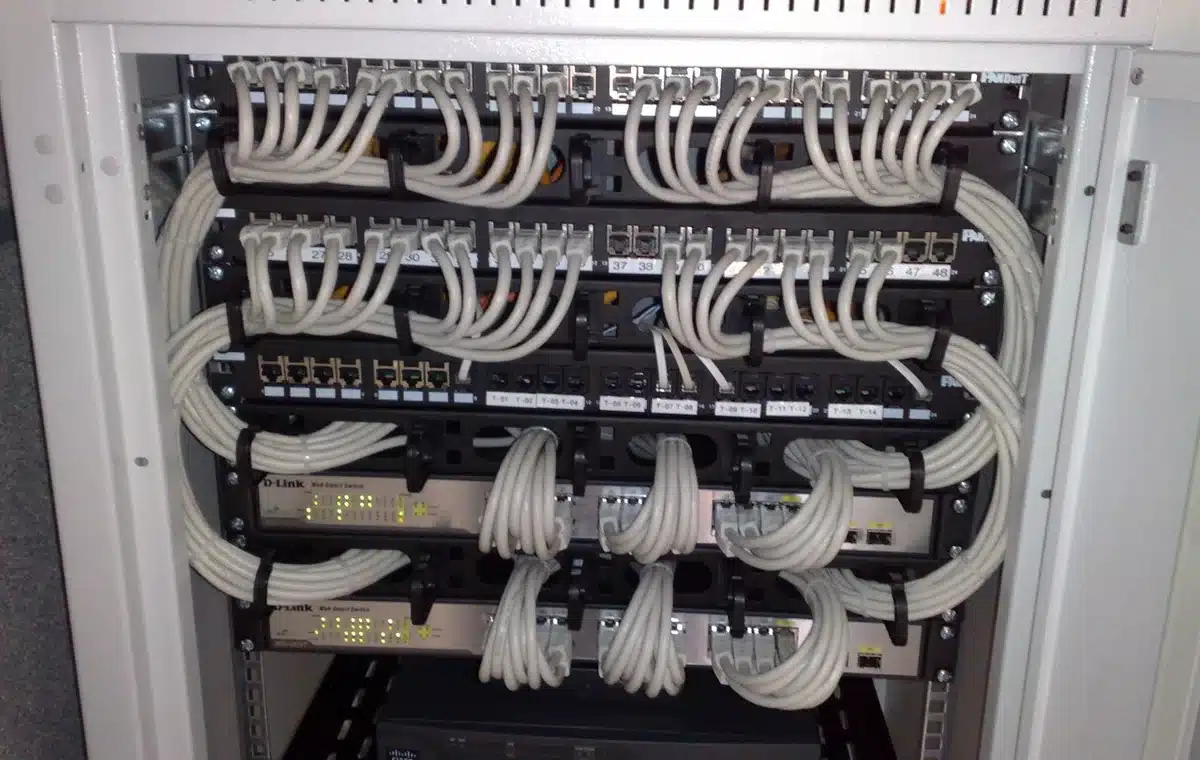
A second connection only helps if staff can use the systems they need. First, identify the primary carrier and the network behind the proposed backup. Different retail brands can share infrastructure, so check the underlying dependency rather than assuming two invoices mean two independent paths.
Next, test coverage, capacity, firewall failover and access to cloud apps in an agreed maintenance window. Include phones, payment services and authentication. Record any sessions that drop and the manual workaround; a backup link is not a promise of uninterrupted service.
Our Australian carrier-outage analysis explains the risk. For practical help, connect a network and dependency assessment with backup and recovery support.
Discuss internet backup and recovery
Share your sites, current connections, critical applications and main outage concern. We can agree a review scope without asking you to send credentials or sensitive records.
Ask your IT provider for recovery evidence
A useful review should show where the plan works and where it does not. Ask for evidence against the agreed business priorities:
- Which systems, data and configuration are inside the backup scope?
- Who receives failed-job alerts, and who checks that someone acts on them?
- Can an attacker using a normal or compromised administrator account delete the recovery copies?
- When did the last end-to-end recovery test happen, and how long did it take?
- Could a second authorised person recover the service without relying on one unavailable employee?
- What did a business user verify after the technical restore?
ASD’s system-management guidance emphasises appropriate backup coverage and restoration testing. Turn that principle into a dated test record, with the system tested, the outcome and an owner for each remaining issue.
Do not run a destructive recovery exercise on production without an agreed method, approvals and rollback arrangements. Start with a discussion exercise, then arrange a controlled technical test. Managed IT support should make ownership and follow-through clear.
A practical 30-day starting plan
- Week one: identify critical activities, decision-makers and supplier contacts. Agree the recovery targets with the people responsible for the business.
- Week two: map backup coverage and access dependencies. Check which gaps need configuration work, a different service or a documented workaround.
- Week three: walk through one scenario with staff. Arrange an appropriately scoped restore test and record the result.
- Week four: fix the highest-impact gaps, circulate the approved plan and book the next review.
Review the plan after significant changes, not just on an anniversary. A move to a new office, a replacement IT provider or a cloud migration can change the recovery sequence. Set a test frequency that reflects your risks and obligations. A quarterly discussion exercise is a reasonable starting proposal, not a universal compliance requirement.
Questions Australian business owners ask
Does a small business need a long document?
No. It needs enough detail for the right people to take the right action. Start with essential activities and contacts, then add tested procedures. A short, maintained business continuity plan is more useful than a large document nobody can follow.
Are backups enough if we work entirely in the cloud?
No. You still depend on accounts, devices, connectivity, suppliers and people. Backups help recover information, but they do not by themselves provide alternate communications or make business decisions.
How much does continuity planning cost?
It depends on the number of systems, data volume, recovery targets, existing protection and testing scope. Ask for a scoped quote separating planning, implementation, ongoing protection and recovery exercises. Avoid comparing subscriptions without comparing what can actually be restored.
Can your business prove it could recover?
Compuloop Pty Ltd helps Australian businesses review backup coverage, Microsoft 365 recovery, IT dependencies and restore testing. Start with the systems that matter to your customers, then prioritise the gaps.
Tell us your staff count, key applications, current backup arrangements and the disruption you are most concerned about. We can discuss an appropriate review scope and next steps. Do not send passwords, recovery codes or confidential client files in your enquiry.
Discuss a backup and continuity review
Prefer to speak? Call 1300 007 613.
Published by Compuloop Pty Ltd. Core guidance checked 13 October 2026; internet-backup buying guidance updated 21 October 2026. This article provides general business and technology guidance, not legal, insurance or emergency-response advice. Confirm requirements with your relevant advisers and service providers.