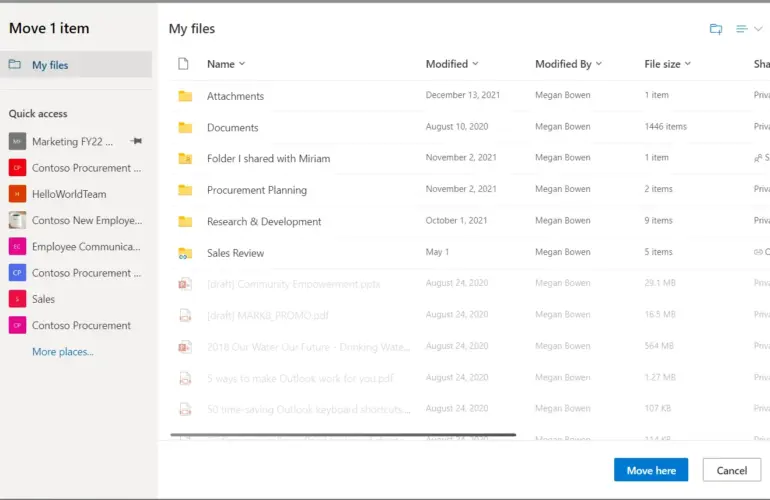
Cloud migration services should do more than copy files or move a server. Instead, a sound migration identifies what the business depends on, chooses the right cloud model, protects identities and data, rehearses the cutover, and leaves staff with a system the support team can manage.
For Australian businesses, the plan also needs to address privacy, data location, connectivity, recovery and who remains responsible after the provider takes over part of the platform. Therefore, local planning matters as much as the platform choice.
What cloud migration services actually include
A migration is a business change program with technical work inside it. For example, the scope can cover Microsoft 365, SharePoint, OneDrive and Teams; identity through Microsoft Entra; applications and databases running in Azure; hosted servers; file shares; backups; or a hybrid environment that keeps selected systems on-premises.
In practice, the target should follow the workload. A browser-based collaboration platform needs a different plan from a latency-sensitive database, a legacy accounting application or a server that depends on specialist hardware.
| Current environment | Possible destination | Assessment questions |
|---|---|---|
| Local file server | SharePoint, Teams and OneDrive | Who owns each folder? Which permissions, file names, versions and external links must be retained? |
| On-premises Windows or Linux server | Azure virtual machines or managed services | What applications, ports, identities, databases, backup jobs and other servers does it depend on? |
| Legacy email platform | Microsoft 365 and Exchange Online | How will domains, mail flow, shared mailboxes, archives, mobile devices and coexistence be handled? |
| Standalone user accounts | Microsoft Entra identity | How will MFA, administrator roles, break-glass access, device compliance and offboarding work? |
| Existing cloud tenancy | Secure or consolidated tenancy | Which licences, guest users, applications, permissions, policies and billing relationships already exist? |
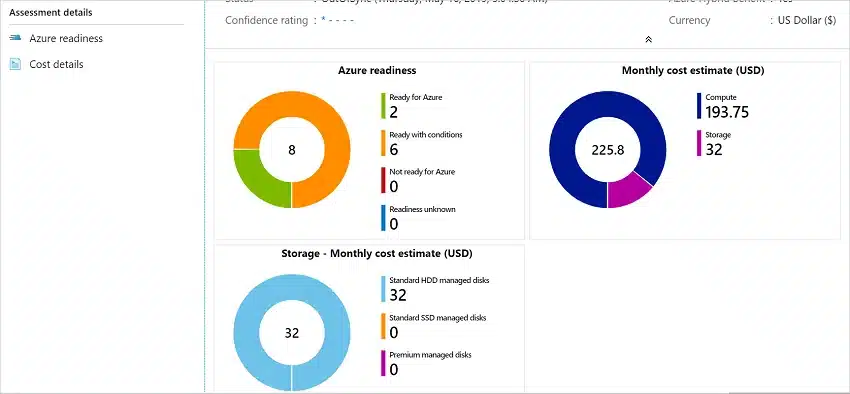
Microsoft describes an Azure Migrate assessment as a point-in-time view of workload readiness, cost and migration guidance. Consequently, an assessment provides evidence for planning; it does not guarantee that a workload will behave correctly after cutover.
How much does cloud migration cost in Australia?
There is no responsible single price for a cloud migration without an inventory. For instance, two businesses with 25 staff can have completely different workloads. One may need email and a tidy file migration. In contrast, the other may have terabytes of poorly owned data, custom applications, scanners, macros, compliance obligations and a narrow weekend cutover window.
As a result, a professional quote should separate the project into visible cost components:
- Discovery and assessment: users, devices, data, applications, contracts, risks and dependencies.
- Target design: tenancy, subscriptions, identity, network, security, backup, data location and governance.
- Migration execution: tooling, bandwidth, pilots, data passes, remediation, cutover and rollback coverage.
- People and adoption: communications, training, new workflows and floor support after launch.
- Ongoing operation: licences, cloud consumption, monitoring, support, backup testing and cost review.
A seven-step cloud migration strategy
First, Microsoft’s Cloud Adoption Framework begins with business objectives, priorities, guardrails and measurable outcomes. That is a useful discipline for smaller organisations too. Above all, the technology should support the business case, not become the business case.
Build an inventory of users, devices, servers, applications, domains, data, integrations, licences and vendors. Record business owners and technical owners.
Agree on the outcome: better resilience, safer remote work, retirement of old hardware, consolidation, improved recovery or a new operating model.
Select the right SaaS, PaaS, hosted or infrastructure services. Define identity, data location, network, monitoring, backup and support responsibilities.
Prepare MFA, administrative roles, Conditional Access, device controls, logging, recovery accounts and least-privilege permissions before production data arrives.
Use representative staff, data and applications. Test performance, permissions, printing, scanning, mobile devices, macros, external sharing and restore procedures.
Publish the schedule, freeze changes when required, run final synchronisation, validate business functions and retain a tested fallback route.
Monitor incidents, remove obsolete access, right-size resources, confirm backups and ownership, update documentation and review cloud spending.
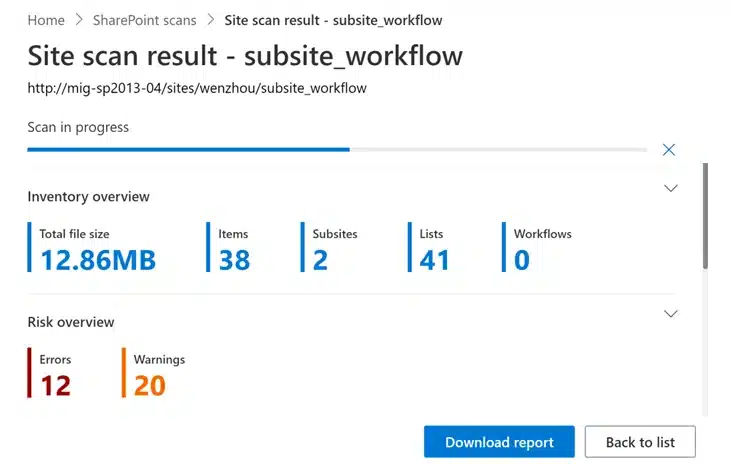
Next, Microsoft’s SharePoint Migration Tool can scan source sites and report inventory and migration risks before a SharePoint move. However, a scan does not replace business decisions about site structure, ownership, stale data or the permissions people should have in the new environment.
Australian privacy and cloud security considerations
Australian organisations should establish what information is moving, who can access it and where a provider may process it. The OAIC explains that APP 8 can apply when an organisation discloses personal information to an overseas recipient. However, the treatment depends on the circumstances, including whether the business retains effective control. Therefore, obtain legal or privacy advice for regulated or sensitive data.
In addition, the Australian Cyber Security Centre publishes cloud guidance for small and medium businesses, including Microsoft 365 examples aligned with Essential Eight principles. It also stresses the shared-responsibility model: the cloud provider secures parts of the service, while the customer remains responsible for areas such as identities, access, configuration, data and devices.
Use MFA, separate administration, least privilege, emergency access and a documented joiner-mover-leaver process.
Classify sensitive information, confirm retention and deletion needs, review external sharing and document data-location decisions.
Vendor availability is not the same as your backup strategy. Confirm recovery scope, retention, ownership and representative restores.
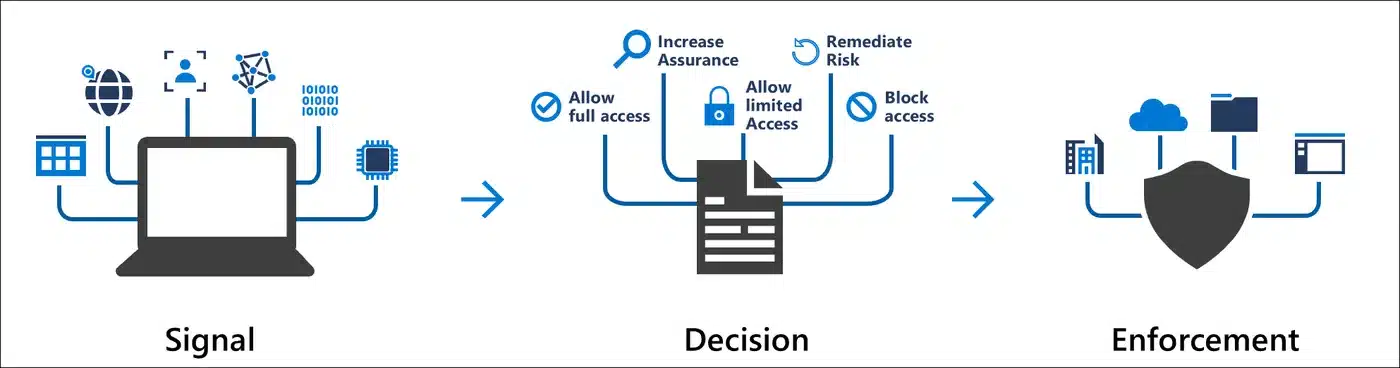
Similarly, Microsoft Entra Conditional Access can combine user, device, location and risk signals before requiring controls such as MFA or a compliant device. Pilot policies in report-only mode where appropriate, and exclude carefully protected emergency accounts.
Three realistic Australian cloud migration scenarios
These are illustrative scenarios, not customer claims. Nevertheless, they show why an inventory and business-led design matter.
A 25-person team has Microsoft 365 email but still stores client documents on a local file server. The migration groups files by business owner, removes stale access, creates SharePoint sites for team records and uses OneDrive for personal work. The cutover includes an initial data pass, delta synchronisation and supported user onboarding.
Office and project staff need reliable access to drawings, photos and documents. The plan pilots sync behaviour over site connections, defines which libraries staff can use offline, separates project guests from employees, and keeps large specialist datasets on an appropriate platform rather than forcing everything into one service.
A server-based application depends on SQL, scheduled tasks, IP allow-lists and a vendor licence. Therefore, Azure assessment is only the start. The migration also tests latency, vendor support, backup recovery, monitoring, DNS, integration accounts and rollback before moving production.
How to choose a cloud migration provider
Finally, ask prospective providers to explain the plan in business language and show what the scope includes. A useful proposal should identify assumptions, exclusions, responsibilities and acceptance tests.
- Will the provider assess applications, permissions, identities and integrations—not just count users and gigabytes?
- Will you receive a target architecture, migration runbook, communication plan, rollback criteria and support arrangements?
- How will the provider handle administrative access, MFA, logs, backups and emergency accounts?
- Which work will the provider perform directly, and which work depends on vendors or subcontractors?
- How will the provider test business workflows and obtain owner sign-off?
- What remains your responsibility after the project closes?
In summary, Compuloop can scope cloud migration services across Microsoft 365 and the modern workplace, business cloud hosting, backup and recovery, cyber security and ongoing managed IT support. The first step is a practical discussion about the existing environment and the business outcome.
Plan the migration before you move production data
Tell Compuloop what you use today, what is causing risk or friction, and what must keep working. We can help map the environment, identify migration dependencies and prepare a staged plan for your Australian business.
Cloud migration services FAQs
What are cloud migration services?
They are the assessment, design, security, data movement, testing, cutover and support activities required to move workloads from an existing environment to cloud services. The scope may include Microsoft 365, Azure, identity, file systems, applications, databases and backups.
How long does a cloud migration take?
Timing depends on data volume, application complexity, bandwidth, remediation and acceptable downtime. A team may complete a straightforward email or file migration in planned stages. However, an application estate can require extended discovery, testing and vendor coordination.
Can a business migrate without downtime?
Some workloads support near-zero-downtime methods, but test the claim rather than assuming it. For example, many projects use staged replication and a short final cutover. The plan should state expected impact, validation checks and rollback criteria.
Does moving to the cloud replace backup?
No. Service availability, retention and backup are different controls. Instead, confirm which data your team can recover, for how long and by whom. Then test a representative restore.
Should all workloads move to the cloud?
No. Some workloads are better retained, retired, replaced or redesigned. A hybrid approach can be appropriate when latency, specialised hardware, licensing, sovereignty, cost or vendor support make a direct move unsuitable.
Primary sources
- Microsoft Cloud Adoption Framework: develop a cloud adoption strategy.
- Microsoft Cloud Adoption Framework: execute migration to cloud.
- Microsoft Learn: create an Azure Migrate assessment.
- Microsoft Learn: scan and assess a SharePoint site with SPMT.
- Microsoft Learn: Microsoft Entra Conditional Access.
- Australian Cyber Security Centre: small business cloud security guides.
- Australian Cyber Security Centre: cloud shared-responsibility guidance.
- OAIC: APP 8 cross-border disclosure guidance.
Editorial method: the primary keyword was selected from an Australian AnswerThePublic report and checked against Compuloop’s Australian Search Console visibility. Product and government guidance was checked against the primary sources above on 1 October 2026. Microsoft screenshots are reproduced for editorial explanation and remain the property of Microsoft. The scenarios are illustrative and are not presented as customer case studies. This article is general technology information, not legal or privacy advice.