SharePoint migration cost in Australia depends on the work needed to make files usable and secure after the move. Data volume matters, but permissions, ownership, applications and staff training can matter more. A one-terabyte file share with clear owners may be simpler than a smaller archive with years of broken access rules.
This guide helps Australian business owners and operations managers compare proposals. The worked numbers below are explicit planning assumptions, not market averages, published Compuloop rates or a binding quote.
What are you actually moving to SharePoint?
A file-server migration is not the same project as moving Google Drive, Dropbox, existing SharePoint sites or an entire Microsoft 365 tenant. Each source has different ownership, permissions, version history and application dependencies. State the source clearly when requesting a quote.
Shared business records generally need team ownership. Individual working files have a different lifecycle. Decide which content belongs in SharePoint libraries and which belongs in OneDrive before selecting a tool. Our SharePoint vs OneDrive Australian guide explains that distinction.
What makes up SharePoint migration cost?
| Workstream | What to include in the scope | What increases effort |
|---|---|---|
| Discovery | Inventory of sources, file counts, size, owners and applications. | Multiple servers, inaccessible folders and undocumented systems. |
| Design and security | Sites, libraries, groups, sharing rules and administrator access. | Unique permissions, guest workflows and sensitive records. |
| Cleanup and migration | Source fixes, mapping, pilot moves, migration jobs and error remediation. | Unsupported names, deep paths, duplicates and version requirements. |
| Testing and cutover | User acceptance, changed-file handling, communication and rollback decisions. | Strict downtime windows and complex business dependencies. |
| Adoption and handover | Training, support, owner documentation and final reports. | Different roles, locations and workflows. |
To compare SharePoint migration cost fairly, ask who does each task. A low transfer-only price may leave your team responsible for cleanup, permissions and training. That can be suitable if you have capacity; it should not be a surprise after the project starts.
SharePoint migration cost: an Australian budgeting example
Suppose a business plans a straightforward file-share move and uses the following hypothetical labour model. Replace every assumption with the supplier’s assessed hours and agreed rate before approving a project.
| Assumed work | Illustrative hours |
|---|---|
| Discovery and inventory | 4 |
| Destination and permissions design | 6 |
| Pilot and initial migration | 8 |
| Cutover and acceptance testing | 6 |
| Training and handover | 6 |
| Total | 30 |
Your full SharePoint migration cost may include more than labour. For example, budget separately for subscriptions, paid tools, storage, backup, custom development, travel and ongoing support. A project with application remediation or complex permissions could need a different scope entirely. Ask whether GST is included in every figure you compare.
Does Microsoft 365 already include what you need?
Check existing user entitlements before buying more licences. Microsoft’s Australian Business plans include SharePoint, but licensing does not pay for planning or delivery of a migration. Confirm destination capacity and the licences needed for your chosen identity, device and security controls.
For reference, Microsoft’s base Business Standard plan with Teams is listed at AU$21.00 per user/month on an annual subscription paid yearly, excluding GST, checked 21 October 2026. Twenty users would total AU$5,040 a year excluding GST at that displayed rate. If those users already have the required licences, do not automatically count the entire subscription as a new migration expense. Check Microsoft’s current Australian plans.
Compare the platform decision separately in our Microsoft 365 vs Google Workspace guide. An Azure subscription is not automatically required just because you use SharePoint Online. Custom storage or other Azure services, if proposed, should have their own explanation and cost.
Is Microsoft’s migration tool enough?
Microsoft provides the SharePoint Migration Tool for supported source scenarios. Its availability does not remove the work of planning, validation and remediation. Do not assume one tool supports every cloud source or tenant-to-tenant move.
Microsoft’s migration settings documentation includes scan-only assessment, user mapping, permission and version-history options. Choose these deliberately. If you use custom Azure storage, Microsoft’s guidance warns that related charges may apply. Request the exact tool, licence basis, data handling and support responsibilities in your quote.
Three workplace scenarios that change the scope
A small accounting practice with client folders
The difficult work may be separating client access, defining team owners and checking templates or spreadsheet links—not transferring bytes. Pilot a representative client folder with the people who actually use it. Test staff access and external sharing before the full move.
A construction business with office and site teams
Consider large drawings, mobile access, poor connectivity and specialist applications. SharePoint should not be treated as a universal replacement for every file-server workload. Check whether design tools need a different storage pattern. Train users on the agreed way to access documents instead of syncing everything to every laptop.
A growing consultancy with records in personal drives
Identify business-owned records, departing-user risks and shared links. Moving content into a team library can change access and bookmarks. Assign owners, communicate the new destination and test a sample of links and workflows.
These are illustrative workplace scenarios, not named clients, completed Compuloop projects or outcome claims.
How to compare SharePoint migration cost quotes
- What is included? Specify sources, users, data size, file counts and libraries.
- What must we fix first? Ask for a pre-migration scan and a list of exclusions.
- Who approves access? Business owners should validate the group and sharing design.
- How are changes handled? Define the final transfer, source freeze and changed-file reconciliation.
- What proves completion? Agree error reports, representative content checks, access tests and user acceptance.
- What happens if cutover fails? Define a rollback decision and who can authorise it.
- What happens afterwards? Specify training, handover, support duration and unresolved-item ownership.
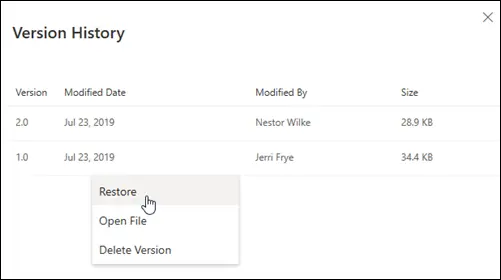
Keep the source available under a controlled plan until validation and recovery requirements are met. Do not assume that a completed transfer makes it safe to delete the old server or backup immediately.
Australian data and access requirements
Record contractual requirements for data location, retention, external sharing and sensitive information before designing the destination. Confirm the actual Microsoft 365 tenant and workloads rather than assuming every cloud component has identical commitments. This guide is technical buying guidance, not legal or compliance advice.
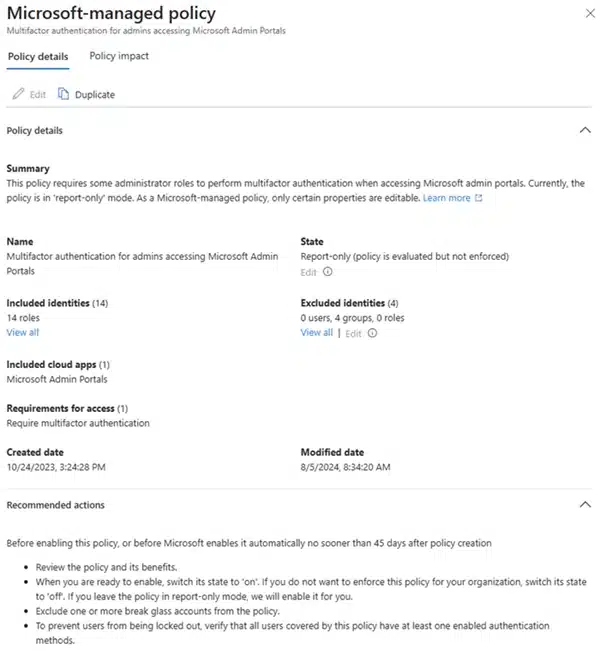
Review administrator access, MFA and user groups as part of the project. A migration tool cannot decide which colleague should see a confidential folder. The business needs to approve that decision. For long-term ownership and support, our managed IT vs internal IT guide can help clarify responsibilities.
Plan sharing and identity before the move
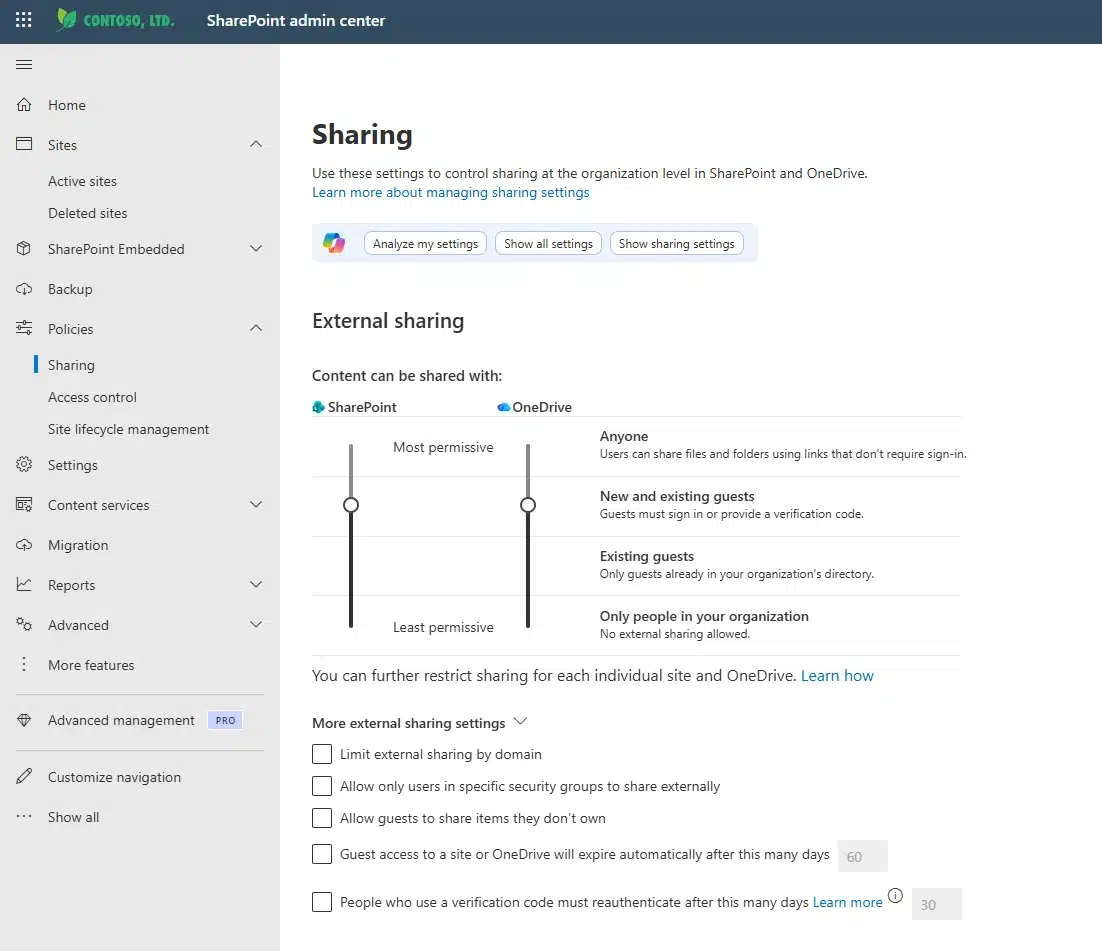
First, agree who can view, edit and share each library. Microsoft provides organisation-level sharing controls, while sites can have tighter rules. When Entra B2B integration applies, guest access also depends on Entra collaboration settings. Check both layers rather than copying the old folder access list.
Make sign-in controls part of the pilot
Next, test access with an ordinary employee, a guest and the administrator who will run the migration. Confirm the required licences and assign someone to review policy changes. For example, a successful transfer does not prove that an external accountant can open the right client records.
Finally, record the agreed design in your handover. This avoids leaving permissions and identity work outside the migration quote. Use safe test files; do not weaken access controls just to make a transfer pass.
SharePoint migration cost FAQs
Can we get a fixed-price migration?
Ask for one after discovery has established the source, design and acceptance criteria. The agreement should describe assumptions, exclusions and how scope changes are approved.
Does staff count determine SharePoint migration cost?
It affects licensing, training and access design, but it does not describe file complexity. For example, a small team with difficult permissions can require more work than a larger team with clean, well-owned content. Therefore, a useful SharePoint migration cost estimate starts with a content review, not headcount alone.
How long will the migration take?
The elapsed time depends on preparation, transfer conditions, throttling, issue resolution and business availability. Labour hours are not the same as calendar duration. Ask for a phased plan after the pilot, not an unconditional overnight promise.
Do version history and recycle bins replace backup?
No single recovery feature should be assumed to cover every business failure. Define retention, recovery requirements and representative restore tests. Review backup and recovery options separately.
Get a SharePoint migration scope for your business
Tell Compuloop where your files live, your staff count, approximate data size and the problems you want to solve. We can discuss the assessment needed for a practical migration proposal.
Request a SharePoint migration scope | Call 1300 007 613
Explore Microsoft 365 Modern Workplace support. Keep confidential client records and passwords out of an initial enquiry.
Sources and editorial method
Product and migration-tool claims link to Microsoft documentation; the referenced base-plan price was rechecked on 21 October 2026. The hours and hourly rate are a transparent hypothetical model, not market research. Compuloop offers related services and has a commercial interest in this topic. Images are existing Microsoft documentation illustrations, not photographs of customer environments.