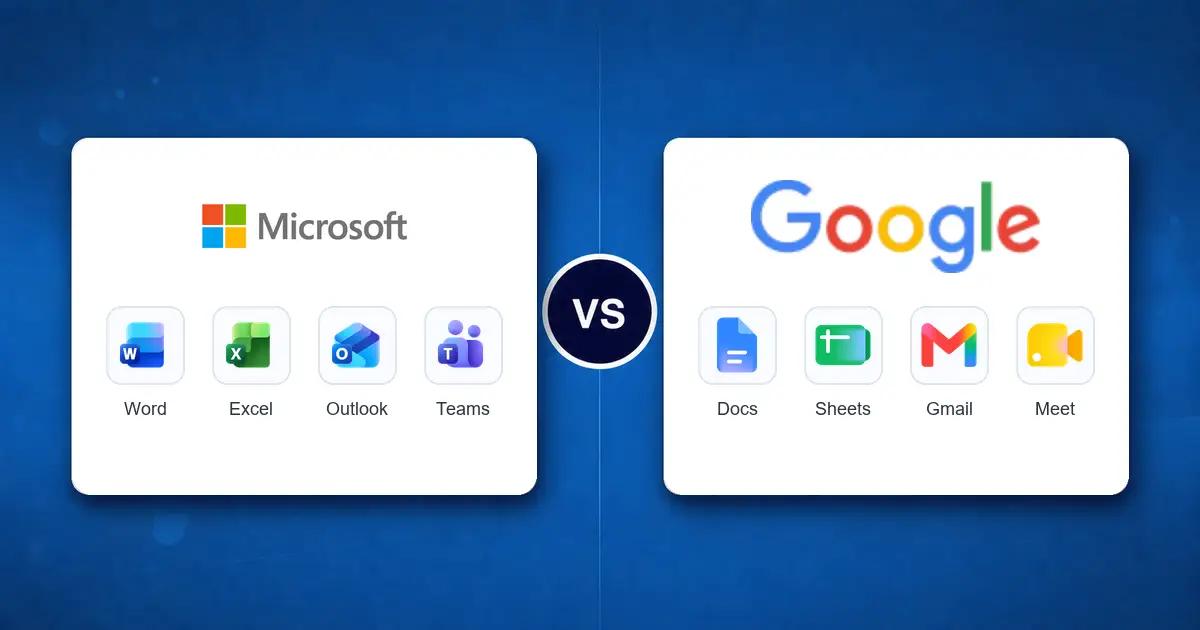
This Microsoft 365 vs Google Workspace Australia comparison is not a contest with one universal winner. Microsoft 365 is usually the stronger fit when a business depends on desktop Word, Excel and Outlook, Windows device management, Teams, SharePoint and Microsoft identity controls. Google Workspace is often a cleaner fit for browser-first teams that value straightforward collaboration in Gmail, Drive, Docs and Meet.
The right decision depends on how staff work, which applications must remain compatible, what security controls are required, where important data must reside and how much change the business can absorb.
Complex Excel workbooks, desktop Office, Outlook, Teams, SharePoint, Entra ID and managed Windows devices.
Gmail, Drive, Docs and Meet used across lightweight, distributed or mixed-device teams.
Migration, training, duplicated subscriptions, security controls, support and document compatibility can outweigh the monthly difference.
Microsoft 365 vs Google Workspace: Australian pricing and features
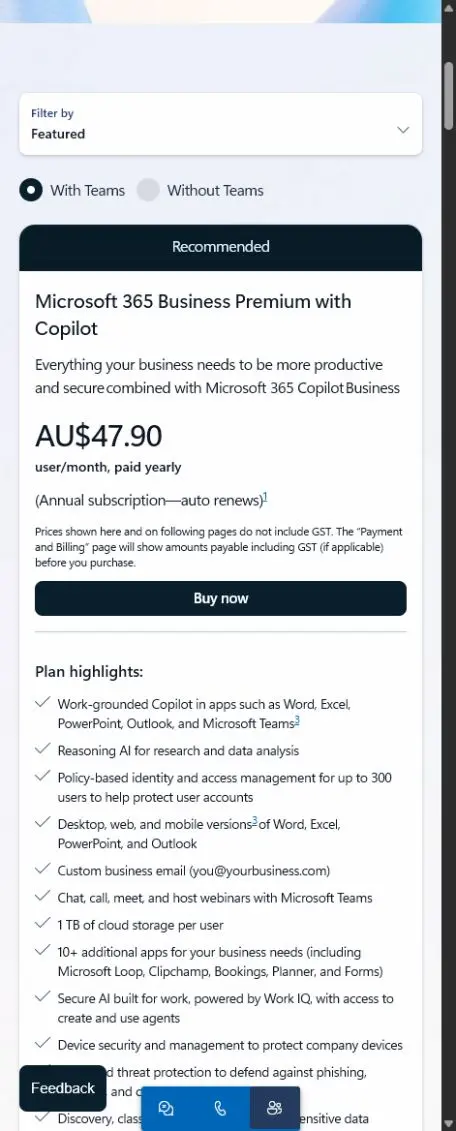
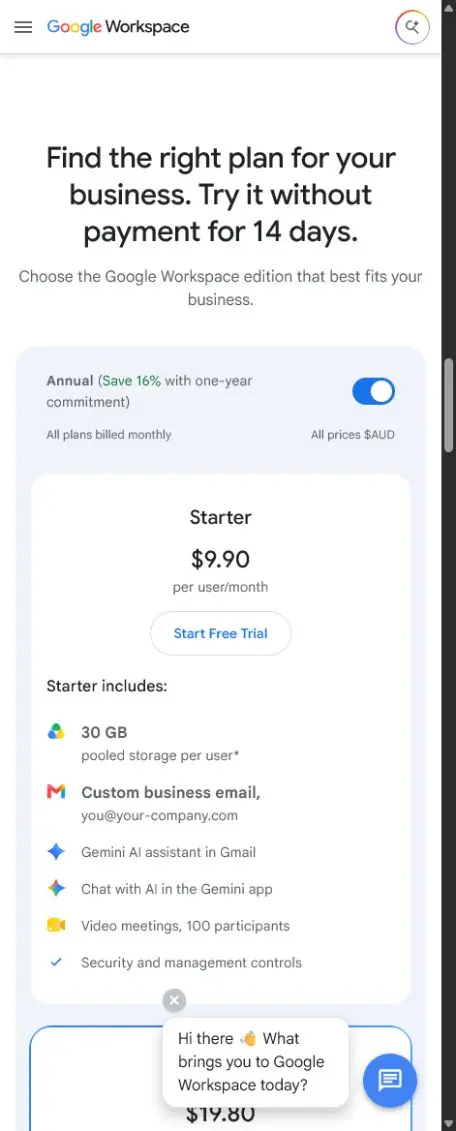
The base rates below were checked against the vendors’ Australian pages on 21 October 2026. Microsoft lists an annual subscription paid yearly; Google lists an annual commitment billed monthly. Both providers state that these displayed prices exclude tax. Confirm GST and the exact amount payable at checkout. These are reference prices, not a Compuloop quote, and the plans are not feature-equivalent.
| Comparison point | Microsoft 365 | Google Workspace | What it means in practice |
|---|---|---|---|
| Entry business plan | Business Basic: AU$10.50 per user/month, paid yearly; Microsoft states prices exclude GST. | Business Starter: AU$9.90 per user/month on the annual commitment, billed monthly. | The headline difference is small. Storage, apps, support and migration effort matter more than the first licence price. |
| Main productivity plan | Business Standard (with Teams, without the paid Copilot bundle): AU$21.00 per user/month, paid yearly, excluding GST. | Business Standard: AU$19.80 per user/month on the annual commitment, billed monthly. | Microsoft includes desktop Office apps; Google remains browser-led. Compare workflows and security controls, not matching plan names. |
| Higher-control business plan | Business Premium (with Teams, without the paid Copilot bundle): AU$32.90 per user/month, paid yearly, excluding GST. | Business Plus: AU$30.90 per user/month on the annual commitment, billed monthly. | Compare the actual controls needed. Microsoft highlights Intune, Defender and policy-based identity; Google Plus adds Vault, advanced endpoint management and enhanced controls. |
Storage, applications and security: compare the working fit
| Comparison point | Microsoft 365 | Google Workspace | What it means in practice |
|---|---|---|---|
| Storage | 1 TB of OneDrive storage per user across the listed Business plans. | 30 GB, 2 TB or 5 TB pooled storage per user for Starter, Standard and Plus. | Google pools storage across the organisation. Microsoft assigns OneDrive storage per user and uses SharePoint for team content. |
| Documents and spreadsheets | Word, Excel and PowerPoint on the web; desktop apps are included with Standard and Premium. | Docs, Sheets and Slides are browser-first with real-time collaboration and offline options. | Test complex Excel models, macros, document formatting and client templates before deciding. |
| Email and meetings | Exchange Online, Outlook and Teams. | Gmail, Calendar, Meet and Chat. | Both support professional email and meetings. Existing habits, integrations, phone requirements and meeting-room equipment often decide the better fit. |
| Management and security | Entra ID is the identity layer; Business Premium adds Intune and Defender capabilities. | Google Admin provides identity, sharing and endpoint controls; the depth increases with Plus and Enterprise. | Neither suite configures itself. Administration, MFA, device ownership, external sharing and offboarding still need documented owners. |
| Business plan user limit | Up to 300 users for the Business plans shown. | Up to 300 users for Business Starter, Standard and Plus. | Larger or more complex organisations should compare enterprise licensing, support and compliance requirements separately. |
Compare the same Microsoft licence bundle
The old table used Microsoft Standard and Premium bundles with paid Copilot. The updated table uses base plans with Teams. Copilot Chat and paid Microsoft 365 Copilot are not the same entitlement. Confirm the exact AI features, licences and usage charges in your order.
What does this mean for a 20-person team?
Using the listed base annual rates, Microsoft 365 Business Standard is AU$5,040 a year excluding GST (20 × AU$21 × 12). Google Workspace Standard totals AU$4,752 at its displayed annual-commitment rate (20 × AU$19.80 × 12), before tax. The pre-tax difference is AU$288 a year. However, the plans are not feature-equivalent, and the final GST-inclusive charge must be confirmed before purchase.
Migration, training, security and support can exceed that gap. Ask for a written total-cost comparison and pilot real client files before switching.
Which is the best productivity suite for small business?
The best productivity suite for small business is the one that matches how its people actually work. A ten-person design studio collaborating in browser-based documents may reach a different conclusion from an accounting practice using complex Excel models, Outlook add-ins and Windows applications.
If customers regularly exchange complex Word documents, Excel models or PowerPoint files, test fidelity in the real files—not a sample document.
Desktop Office, Windows devices and shared drives point in one direction. Browser-led work across Chromebooks, Macs and mobiles may point in another.
Compare onboarding, MFA, administrator roles, mobile devices, Windows policies, remote wipe and offboarding rather than checking a generic “security included” box.
Review accounting, CRM, practice-management, line-of-business, meeting-room, telephony, scanner and email-archiving dependencies before migration.
Microsoft 365: where it is usually stronger
Microsoft 365 has a natural advantage when a business already runs on Windows and Office documents. Business Standard and Business Premium include desktop Word, Excel, PowerPoint and Outlook, while Business Basic uses web and mobile versions. Exchange, Teams, SharePoint and OneDrive connect email, meetings, team sites and personal work files inside the same tenant.
- Desktop Office compatibility: important for advanced Excel models, macros, document automation, detailed formatting and industry add-ins.
- Windows management: Business Premium brings identity, device-management and endpoint-security capabilities into a model built around Entra ID, Intune and Defender.
- Structured team content: SharePoint can separate team-owned information from an individual’s OneDrive when it is designed and governed properly.
- Australian core-service data residency: Microsoft’s Product Terms documentation states that tenants provisioned in Australia receive Australian at-rest commitments for listed core data including Exchange, SharePoint, OneDrive, Teams messages and stored Copilot interactions. Confirm the exact workload and tenant location.
Google Workspace: where it is usually stronger
Google Workspace is built around a cloud-first, browser-based working model. Gmail, Drive, Docs, Sheets, Slides, Calendar, Meet and Chat use a consistent web experience, and Google includes Gemini capabilities across its current business plans at different levels.
- Fast browser collaboration: Docs, Sheets and Slides make simultaneous editing and comments straightforward for distributed teams.
- Simple everyday experience: teams already comfortable with Gmail and Drive may need less user training for common email and document tasks.
- Pooled storage: Standard and Plus provide materially more pooled storage per user than Starter, which can suit teams with shared media or project files.
- Mixed-device working: the browser-centred model works naturally across Windows, macOS, ChromeOS and mobile devices.

Data residency and Australian privacy: do not reduce it to a tick box
Data residency is one part of a wider privacy and risk assessment. Microsoft’s documentation provides Australian commitments for specified core Microsoft 365 data when the tenant is provisioned in Australia. Google’s Workspace region controls cover supported editions but currently list the United States, European Union or no preference.
The Office of the Australian Information Commissioner explains that APP 8 generally requires reasonable steps before disclosing personal information to an overseas recipient and can make the Australian entity accountable for how that recipient handles the information. The same guidance also notes that using an overseas cloud provider may, in limited circumstances, be treated as a use rather than disclosure when binding contracts and effective control are present.
Practical decision: record what data is stored, which services are in scope, the tenant’s actual location, contractual protections, administrator access, subprocessors, deletion and retrieval rights, incident notification and any industry-specific requirements. Obtain privacy or legal advice where obligations are material.
The hidden cost is usually migration and operating change
A cheaper licence can become an expensive migration if staff lose familiar workflows, complex files require repair or both suites remain active for months. Conversely, staying with a poorly configured platform can preserve licence waste, weak access controls and recurring support problems.
Before approving a migration, test these six things
- Email and calendars: shared mailboxes, delegated access, aliases, rooms, archives, retention and mobile profiles.
- Files: ownership, permissions, shared drives, SharePoint sites, OneDrive data, external links and file-name constraints.
- Applications: Outlook add-ins, Excel macros, scanners, CRM plugins, email relays and automated reports.
- Identity and devices: MFA, administrator accounts, SSO, Windows sign-in, mobile management and offboarding.
- People: pilot users, training, communications, support coverage and clear cutover dates.
- Recovery: backup scope, retention, representative restore tests and the rollback plan.
Five common Australian business scenarios
Microsoft 365 usually provides the lower-friction path, particularly when clients exchange Office formats and Windows applications are central.
Google Workspace can be attractive when speed of collaboration matters more than desktop Office or deep Windows management.
Microsoft 365 Business Premium deserves close evaluation because identity, device and endpoint controls can be planned together.
Google Standard or Plus may offer useful pooled storage, but test transfer performance, ownership, external sharing and specialist application workflows.
Microsoft’s documented Australian core-service commitments may simplify the assessment. Verify every workload and obtain appropriate compliance advice.
Should an Australian business use both?
Sometimes, but only for a defined reason. Keeping Microsoft 365 for Office and identity while using Google Workspace for collaboration can duplicate email, storage, calendars, user administration, security policies and support. It can also create uncertainty about where the final version of a file belongs.
If both suites are required, document the system of record for email, identity, documents, meetings and external collaboration. Give each platform a clear owner and lifecycle rather than allowing teams to adopt both informally.
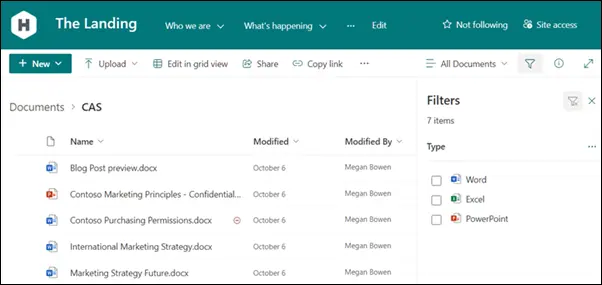
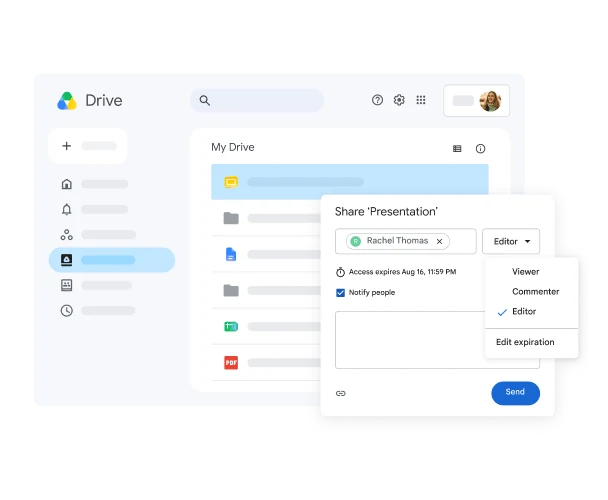
Real Microsoft and Google file-sharing examples
These vendor interfaces make the practical comparison tangible. Use them as a starting point, then test ownership and guest access with your own representative files.
A buyer checklist before changing productivity suites
Ask the person proposing a migration to demonstrate your actual work—not a polished demo tenant.
- An accounting team: open a representative macro-enabled workbook, a client template and an Outlook add-in. Record what works and what needs remediation.
- A browser-first consultancy: test shared ownership, guest access, mobile meetings and departing-user handover in both environments.
- A growing Windows-based business: compare MFA, device policies, administrator access and recovery alongside the licence tier. Buying a security-capable plan is not the same as configuring it.
These are illustrative workplace tests, not claims about named Compuloop customers. See our SharePoint vs OneDrive guide for file ownership and our managed IT vs internal IT comparison for ongoing responsibility.
Before changing suites, check the environment you already own
A licence change will not fix unclear file ownership, risky guest access or overlapping subscriptions. For example, our anonymous SharePoint governance case study shows how a structured review addressed those issues for an Australian business.
Bring your user count, renewal dates, device mix and the tasks that frustrate staff. Then request a productivity-suite assessment or read our SharePoint migration budgeting guide. Keep passwords and private client files out of the initial enquiry.
A practical Microsoft 365 assessment or migration plan
Users, licences, devices, domains, data, applications, integrations and current pain points.
Role-based plans, security controls, storage, support, data location and total operating cost.
Test real files, meetings, mobile devices, shared access and line-of-business integrations with representative staff.
Use staged data moves, owned communications, rollback points and support coverage through cutover.
Review licences, permissions, devices, backups, unresolved tickets and user adoption after the move.
Get a recommendation based on your environment
Compuloop can assess the users, devices, files, applications and security requirements behind the decision. The output is a practical Microsoft 365 assessment or migration plan—not a recommendation based only on a feature checklist.
Microsoft 365 and Google Workspace FAQs
Is Microsoft 365 better than Google Workspace?
It is usually better for businesses that depend on desktop Office, Windows management, Outlook, Teams and SharePoint. Google Workspace can be better for teams built around browser collaboration and Gmail. The existing environment and migration cost matter.
Which is cheaper for a small Australian business?
At the displayed base-plan rates checked on 21 October 2026, Google Standard is AU$19.80 and Microsoft Standard with Teams is AU$21.00 per user/month on annual terms. Both displayed rates exclude tax, but the apps and billing terms differ. Compare the complete operating cost, not just the licence price.
Can Microsoft 365 and Google Workspace work together?
Yes, but operating both can duplicate identities, email, calendars, storage and support. Define which platform owns each business function and avoid uncontrolled overlap.
Can Compuloop migrate Google Workspace to Microsoft 365?
Compuloop can assess migration scope across identities, mail, calendars, files, permissions, devices and integrations, then prepare a staged Microsoft 365 migration plan with testing and support.
Sources and editorial method
- Microsoft: Australian Microsoft 365 business plans and pricing, checked 21 October 2026.
- Google: Australian Google Workspace business plans and pricing, checked 21 October 2026.
- Microsoft Learn: Product Terms data-residency overview, checked 10 August 2026.
- Google Workspace Admin Help: choose a geographic location for data, checked 10 August 2026.
- OAIC: APP 8 cross-border disclosure guidance, updated 3 October 2025.
Editorial note: AnswerThePublic supplied the comparison topic and supporting search phrases. AI-assisted tools supported research, drafting and layout production. Australian base-plan prices and billing terms were rechecked on 21 October 2026. The source dates above identify the supporting product and privacy guidance. The screenshots are dated editorial captures of the vendors’ official Australian pages. Pricing and product packaging can change; verify current terms before purchase. This article provides general technology information, not legal or privacy advice. Confirm the final licence terms and migration scope before approving a purchase.